Talk to an Expert Back to CS-Cart.com
Menu
Talk to an Expert Back to CS-Cart.com

Contents

  • Install CS-Cart
  • User Guide
    • Introduction to the Administration Panel
    • Look and Feel
    • Manage Products
    • Payment Methods
    • Shipping and Taxes
    • Add-ons
      • How To: Manage Add-ons
      • How To: Install and Upgrade Add-ons from the Marketplace
      • Access Restrictions
      • Age Verification
      • Anti Fraud
      • Attachments
      • Banners Management
      • Bestsellers & On-Sale Products
      • Blog
      • Buy Together
      • Call Requests
      • Catalog Mode
      • Comments and Reviews
      • Customers Also Bought
      • Data Feeds
      • eBay Synchronization
        • How To: Install and Configure eBay Synchronization Add-On
        • Changes in the Interface
        • How To: Create eBay Templates
        • How To: Specify Product Identifiers for eBay
        • eBay-related Category Settings
        • eBay-related Product Settings
        • How To: Get Product Status from eBay
        • How To: Export/Revise Products on eBay
        • How To: Import Complete Orders from eBay
        • How To: End eBay Sales
        • How To: Edit eBay Parameters in Bulk
      • Email Marketing
      • Form Builder
      • Gift Certificates
      • Google Analytics
      • Google Export
      • Google Sitemap
      • HiDPI Displays Support
      • Image Zoom
      • Janrain
      • My Changes
      • MYOB
      • Newsletters
      • Order Barcode
      • Payment Dependencies
      • PayPal Payments
      • Polls
      • Price List
      • Quickbooks
      • Required Products
      • Reward Points
      • RMA
      • RSS Feed
      • Searchanise
      • SEO
      • SMS Notifications
      • Social Buttons
      • Social Login
      • Store Import
      • Store Locator
      • Suppliers
      • Tags
      • Twigmo
      • Vendor Commission
      • Vendor Data Premoderation
      • Video Tutorials
      • Watermarks
      • Wish List
    • Users
    • Marketing
    • Website
    • Orders
    • Currencies
    • Stores
    • Database
    • Files
    • Importing and Exporting Data
    • Logs
    • Settings
  • Upgrade CS-Cart
  • Developer Guide
  • Designer Guide

Page Contents

  • eBay-related Product Settings

This Page

Report a problem

eBay-related Product Settings

To edit the eBay properties of a product, go to Products → Products and click the product you want to edit. Then switch to the eBay tab.

Here you can do several things:

  • Сhoose one of your eBay templates for the product

Hint

To apply a template to multiple products it once, go to Products → Products and tick the checkboxes next to the desired products. Then click the gear button in the right upper corner of the page and choose Edit selected from the dropdown menu.

A pop-up window will appear. Click Unselect all, then tick eBay template and click Modify selected. Specify the appropriate eBay templates for the products and click Save.

  • Tick the Redefine price on eBay checkbox, if you want your product to have a different price on eBay
  • Select the eBay package type

Note

If you don’t know the package type, select Large package. You’ll have to enter exact package dimensions on the Shipping Properties tab.

  • Tick the Redefinition of the product name and description on eBay and edit the corresponding fields, if you want the product’s name and description to be different on eBay.
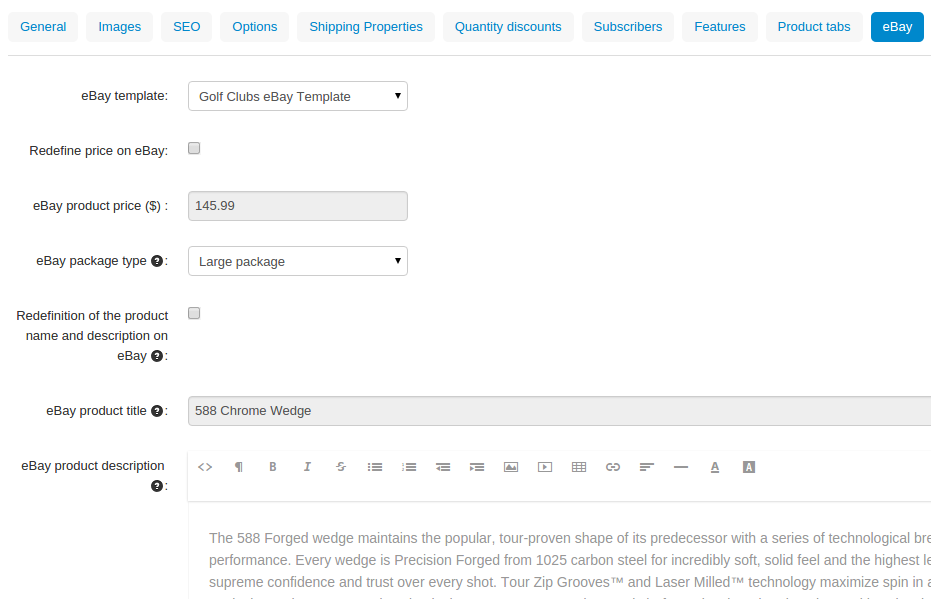
Choose an eBay template for the product, override the product's name, price and description for eBay, select the package type.

Important

The options to redefine product name, description and price on eBay only appeared since CS-Cart 4.3.5. They also appear for those, who upgraded to the new version of the eBay Synchronization add-on via an upgrade package for CS-Cart 4.3.4.


Questions & Feedback

Have any questions that weren't answered here? Need help with solving a problem in your online store? Want to report a bug in our software? Find out how to contact us.

+1 858-345-4015 [email protected]

© Copyright 2026, CS-Cart.